
Blog Summary – Google Business Profile optimization isn’t about doing anything complicated — it’s about doing the basics consistently and correctly. The guide breaks down Google’s three ranking factors (Relevance, Distance, Prominence) and explains that the businesses ranking in the top 3 aren’t there by luck — they’ve systematically built trust signals through specific category selection, a fully filled services section, steady review growth, weekly posts, and consistent NAP across all directories. Your GBP and website need to work together, not separately, and every empty field on your profile is a missed signal. Three real Varanasi businesses — a gastroenterologist, a car accessories shop, and a banquet hall — all hit top 3 rankings and crossed 400 calls per month within 4 to 6 months, purely by executing these fundamentals without any shortcuts or tricks.
Why Most GBP Guides Are Useless
Most Google Business Profile guides tell you the same five things: fill out your profile completely, upload photos, get reviews, post regularly, and stay consistent with your NAP. That advice isn’t wrong. It’s just incomplete.
This guide is different. It’s based on real optimization work done for local businesses in India — including a gastroenterologist, a car care center, and a restaurant — where rankings improved from page 2 obscurity to consistent top 3 visibility. The strategies here are specific, not generic.
The businesses ranking in the top 3 on Google Maps in competitive cities like Varanasi, Delhi, or Mumbai are not there because they filled out their profile. They’re there because they understand how Google actually evaluates local businesses — and they’ve systematically built trust signals across every channel Google can measure.
How Google Actually Decides Who Ranks
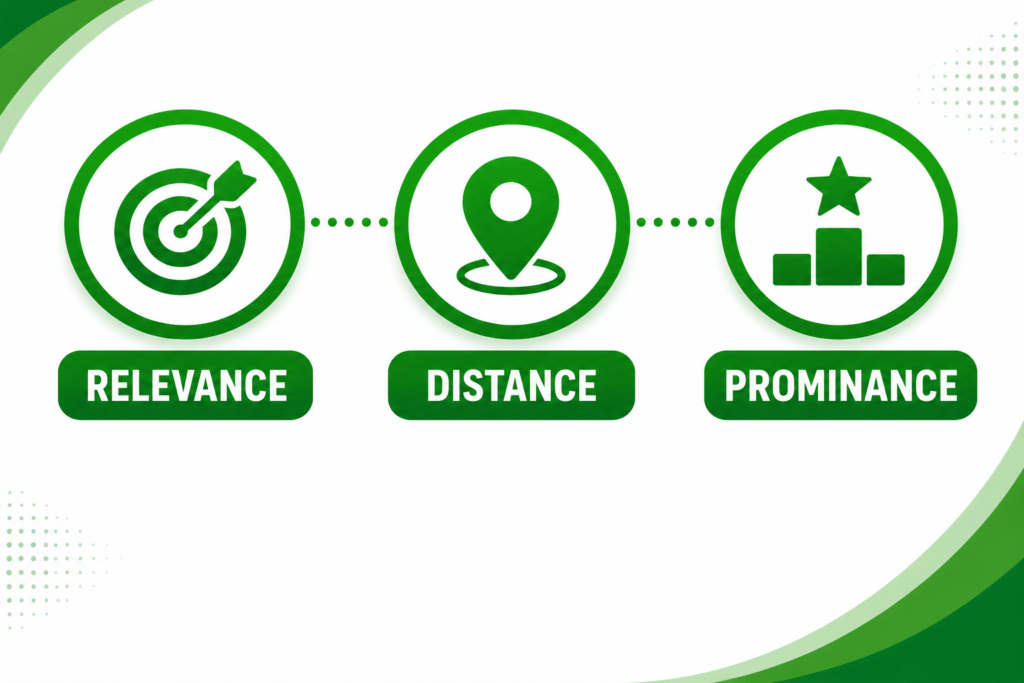
Google uses three official ranking factors for local search: Relevance, Distance, and Prominence. But those three words hide a lot of complexity.
Relevance
Relevance is not just about your business category. It’s about whether everything on your profile — your category, your services list, your description, your posts, your Q&A, and even the text on your website — consistently signals what you do.
If you’re a gastroenterologist but your GBP description reads like a general hospital, Google has to guess what you actually specialize in. If your services section is empty, Google has even less to work with. Relevance is built through specificity, not just category selection.
Distance
Distance is the one factor you can’t optimize directly — Google calculates it based on where the searcher is located. But here’s what most people miss: distance matters less when your prominence and relevance scores are high enough. Businesses have ranked in the top 3 even when they’re not the closest option, purely because their overall profile strength outweighed the distance disadvantage.
Prominence
Prominence is where most of the actual SEO work happens. It reflects how well-known and trusted your business appears across the web. This includes your review count and quality, the number of citations (mentions of your business on other websites), your website’s authority, engagement on your GBP (clicks, calls, direction requests), and how often your profile is updated with fresh content.
A business with 200 genuine reviews, 80 citations, and regular posts will almost always outrank a business with a perfect profile but no external signals.
GBP Setup: The Non-Negotiable Foundation
Before any optimization strategy works, your profile needs a clean foundation. These are the basics — but do them right.
Verification
Verify your profile via postcard, phone, or video verification (Google’s newer method for service-area businesses). An unverified profile can still appear, but you lose control over edits and Google treats it as less authoritative.
Business Name
Use your real business name. Nothing more. Do not stuff keywords into your business name like ‘Dr. Sharma — Best Gastroenterologist Varanasi.’ Google’s guidelines explicitly prohibit this, and it can get your listing suspended. Your business name is what’s on your signboard — that’s it.
Primary Category
Your primary category is the single most important ranking factor you can directly control. It needs to be the most specific, accurate description of your main service.
For example: if you’re a gastroenterologist, don’t select ‘Doctor’ or even ‘Medical Clinic.’ Select ‘Gastroenterologist’ if it exists, or the closest specific option. The more precisely your category matches the search query, the better.
Secondary Categories
Secondary categories support your primary one. A gastroenterology clinic might add ‘Internist,’ ‘Medical Clinic,’ or ‘Hepatologist’ as secondary categories depending on actual services offered. Don’t add categories for services you don’t provide — Google’s algorithms detect relevance mismatches.
Service Area vs Physical Location
If you serve customers at their location (plumber, electrician, home cleaning), set your profile as a service-area business and define your service radius. If customers come to you, keep your physical address visible. If you do both, you can show an address and a service area.
Category Optimization: The Most Underused Ranking Lever
Most business owners pick a category once during setup and never touch it again. This is a mistake.
Google regularly adds new categories — sometimes categories that are far more specific and less competitive than what you’re currently using. A business that periodically audits its categories and updates to more precise options often sees ranking improvements within a few weeks, with no other changes.
How to Find the Right Categories
1. Search for your main service on Google Maps and look at the top-ranking competitors
2. Click on their profiles and note which primary category they’re using
3. Use a GBP category list tool (search ‘GBP category list 2026’) to see all available options
4. Compare what competitors use vs what you currently have
5. If a more specific category exists that accurately describes your business, switch to it
One real example: a car accessories shop was using ‘Auto Parts Store’ as its primary category. After switching to ‘Car Accessories Store’ (a more specific and accurate category), rankings for modification-related searches improved significantly within 6 weeks.
Profile Completeness: Every Empty Field Is a Missed Signal
Google rewards profiles that give users complete, useful information. Every section you leave empty is a signal Google can’t use in your favor.
Services Section
This is one of the most neglected sections. Fill it out with specific services, not vague descriptions. Don’t write ‘Medical Services’ — write specific procedures and treatments you offer. Don’t write ‘Car Services’ — list specific services: denting, painting, PPF coating, seat modification, etc.
Each service can have its own description. Use natural language that matches how customers actually search. If patients search ‘colonoscopy doctor Varanasi,’ your services section should mention colonoscopy specifically.
Products Section
Even service businesses can use the Products section to highlight their key offerings with descriptions and prices (or price ranges). This creates additional indexed content and gives Google more signals about what you do.
Business Description
750 characters. Use them. Your description should mention your primary service, your location, what makes you different, and how long you’ve been operating. Write it for a human first — but include the terms people search for naturally.
Bad example: ‘We provide world-class services to our valued customers with a commitment to excellence.’
Good example: ‘Dr. Saumyaleen Roy is a gastroenterologist in Varanasi with over 15 years of experience treating digestive disorders, liver conditions, and performing procedures like colonoscopy and endoscopy. Clinic located in [area], appointments available 6 days a week.’
Attributes
Attributes let you highlight specific features: ‘Women-led,’ ‘Online appointments,’ ‘Wheelchair accessible,’ ‘In-store pickup,’ etc. These appear in search results and filter options. Select every attribute that accurately applies to your business.
Q&A Section
The Q&A section on your profile is publicly editable — which means anyone can add questions, and anyone can answer them. Proactively seed this section with the most common questions your customers ask, and answer them yourself. This is free content that helps users and adds relevant keywords to your profile.
Reviews: The Ranking Factor That Also Converts
Reviews do two things simultaneously: they influence how high you rank, and they influence whether someone calls you after finding you. Most businesses focus on getting more reviews. The businesses that actually win focus on getting better reviews.
Volume vs Quality
A business with 50 detailed, specific reviews will often outperform one with 200 generic 5-star ratings. Why? Because detailed reviews contain keywords, describe specific services, mention staff names, and signal to Google that the reviews are genuine.
When you ask customers for reviews, don’t just say ‘please leave a review.’ Say: ‘If you can, mention what you came in for and what your experience was like — it helps other patients know what to expect.’
How to Ask for Reviews Without Violating Guidelines
Google’s guidelines prohibit incentivizing reviews (offering discounts, gifts, etc.). What you can do:
• Send a WhatsApp message after a positive interaction with a direct link to your review page
• Display a QR code at your front desk that links directly to the review form
• Train staff to verbally mention reviews after positive patient/customer interactions
• Include a review link in email confirmations or receipts
Responding to Reviews
Respond to every review — positive and negative. For positive reviews, don’t just write ‘Thank you!’ Write a genuine response that mentions the service or experience they described. This reinforces the keywords in their review.
For negative reviews: Respond within 24 hours. Acknowledge the issue, apologize for the experience, and offer to resolve it offline. Never argue publicly. A professional response to a negative review often impresses potential customers more than the negative review hurts.
Review Velocity
A sudden spike of 50 reviews in a week looks unnatural to Google and can trigger a filter. Steady, consistent review growth — 3 to 5 reviews per week — is far more sustainable and credible than irregular bursts.
Photos and Videos: Visual Trust Signals
Photos serve two purposes: they help customers evaluate your business before visiting, and they signal to Google that your profile is active and well-maintained.
What Photos to Upload
• Exterior photos: front of building, parking, signage — helps customers recognize the location
• Interior photos: reception, waiting area, equipment, treatment rooms
• Team photos: doctor/staff professional headshots build trust
• Service photos: work-in-progress shots, before/after, procedures (where appropriate)
• Branded cover photo: your best, most professional image as the cover
Photo Optimization Tips
Use real photos, not stock images. Google can detect stock photos and they generate less engagement. Name your files descriptively before uploading (e.g., ‘gastroenterologist-varanasi-clinic.jpg’ rather than ‘IMG_20240312.jpg’). Upload at least 10 photos to start — then add new ones monthly.
Videos
A 30 to 60 second video tour of your clinic or business can significantly increase profile engagement. Videos don’t need to be professionally produced — a clear, steady phone video with good lighting is sufficient. Patient/customer testimonial videos (with permission) are especially powerful.
Google Posts: The Free Content Channel Most Businesses Ignore
Google Posts appear directly on your Business Profile and in some search results. They expire after 7 days (except Event posts), which means Google expects you to post regularly. Regular posting signals an active, engaged business.
Types of Posts and When to Use Them
• Update posts: share news, clinic timings, new services, seasonal information
• Offer posts: promotions or special rates (include start/end dates)
• Event posts: health camps, awareness drives, workshops
• Product posts: highlight specific services or packages
What Actually Works in Posts
Educational posts consistently outperform promotional ones. Instead of ‘Book an appointment today,’ write something like ‘When should you see a gastroenterologist? If you’ve had digestive problems for more than 2 weeks, here’s what the symptoms might mean…’ and include a call to action at the end.
This type of content gets more engagement because it’s useful. Higher engagement tells Google your profile is trusted and relevant.
Post Frequency
Post at minimum once per week. Two to three times per week is better. Each post should have a clear call-to-action: call now, book appointment, learn more, get directions.
NAP Consistency and Local Citations
NAP stands for Name, Address, Phone Number. When these three pieces of information appear differently across different websites — even small differences like ‘St.’ vs ‘Street’ or ‘+91’ vs ‘0’ in the phone number — it creates confusion for Google and weakens your local authority.
Where to Build Citations
• Justdial, Sulekha, IndiaMART (essential for India)
• Practo, Lybrate (for medical businesses)
• Google Maps (obviously), Bing Places, Apple Maps
• Facebook Business Page
• Industry-specific directories relevant to your niche
• Local Varanasi business directories and chamber of commerce listings
Citation Audit Process
6. Search your business name + city on Google
7. Check every listing that appears in the first 3 pages
8. Note any inconsistencies in name, address, or phone
9. Update or claim each incorrect listing
10. Build new listings on platforms where you’re not present
Citation quality matters more than volume. 20 accurate, relevant citations will outperform 100 inconsistent ones.
How Your Website Supports GBP Rankings
Your GBP and your website are not separate — Google evaluates them together. A strong website with local SEO signals reinforces your GBP rankings.
Key Website Signals
• NAP on every page, ideally in the footer, exactly matching your GBP information
• Location-specific landing pages for each service area
• Schema markup (LocalBusiness, MedicalBusiness, etc.) in your site’s code
• Fast loading speed — especially on mobile
• Service pages that mirror your GBP services section
If your GBP says you offer ‘colonoscopy in Varanasi’ but your website has no page or content about colonoscopy, Google sees a relevance gap. Fill it.
Entity SEO and AI Overviews: The 2026 Reality
Google no longer thinks about websites as just pages of text. It thinks about entities — businesses, people, places, concepts — and the relationships between them. Your business is an entity, and Google is constantly building a picture of what that entity is, what it does, where it operates, and how trustworthy it is.
What This Means Practically
Every piece of information about your business that exists online — your GBP, your website, your social profiles, your listings on directories, mentions in news articles or blogs — contributes to Google’s understanding of your business entity.
When all these signals are consistent, specific, and well-maintained, Google’s confidence in your entity increases. That confidence translates into better rankings, and increasingly, into your business being referenced in AI Overview answers.
AI Overviews and Local Businesses
AI Overviews (Google’s AI-generated summaries at the top of search results) now sometimes include local business recommendations. Businesses with complete, accurate, well-reviewed GBP profiles are more likely to be surfaced in these answers.
The optimization strategy is the same — complete profile, strong reviews, consistent NAP, active posting — but the payoff now extends beyond just ranking in the map pack.
Case Studies: Real Results from Varanasi Businesses
Case Study 1: Gastroenterologist Clinic
Starting point: GBP profile existed but was incomplete. Category was set to ‘Doctor’ rather than a specialty. Services section was empty. Only 7 reviews. No posts had been published.
What was done:
• Primary category changed to ‘Gastroenterologist’
• Services section filled with 12 specific procedures including colonoscopy, endoscopy, ERCP, and liver function evaluation
• Business description rewritten to include specific conditions treated and location details
• Review acquisition campaign launched via WhatsApp — asking patients to mention their specific treatment
• Weekly educational posts started — digestive health tips, when to see a specialist, etc.
• Photos added: exterior, waiting room, doctor headshot, equipment
• Citations built on Practo, Lybrate, Justdial, and 8 other platforms
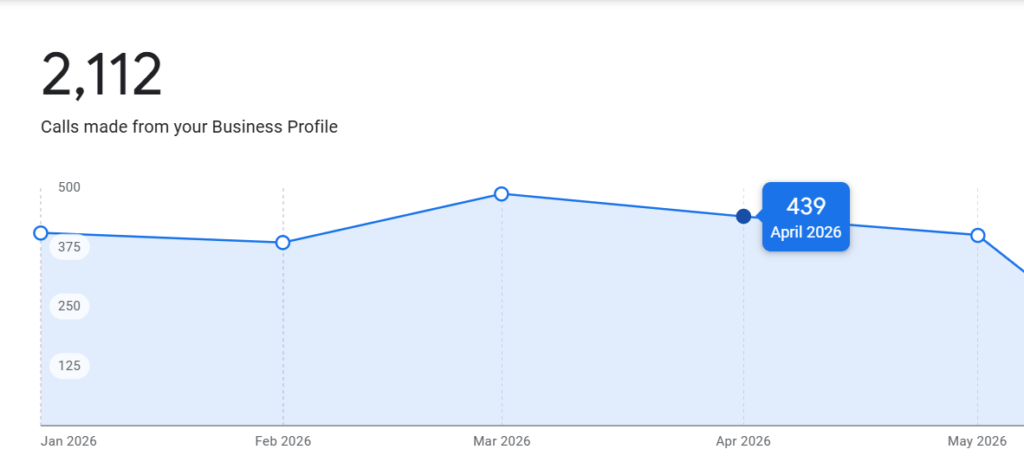
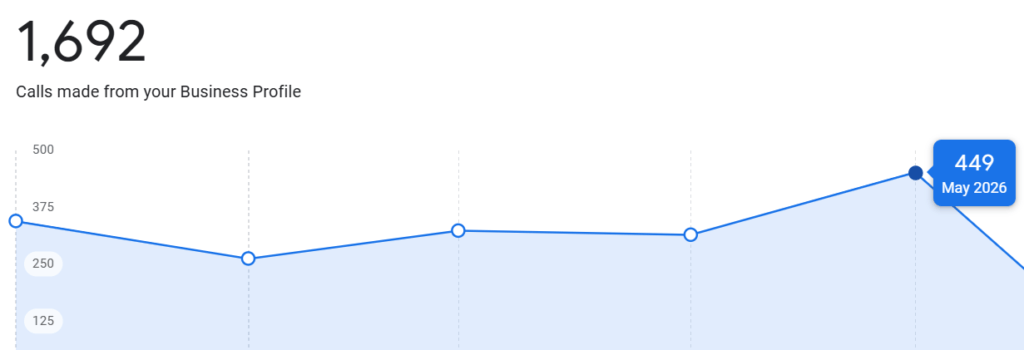
Results over 6 months: Profile moved into top 3 for ‘gastroenterologist Varanasi’ and multiple related searches. Monthly calls from GBP crossed 400.
Case Study 2: Car Accessories Business
Starting point: Profile active but using wrong primary category. Review count was low. No regular posting. Several citation inconsistencies.
What was done:
• Primary category updated from ‘Auto Parts Store’ to ‘Car Accessories Store’
• Service categories added for PPF coating, seat modification, dashboard customization
• Photo strategy implemented: before/after modification photos uploaded regularly
• Review campaign focused on asking customers to describe the specific modification done
• Citation audit conducted — 11 inconsistencies corrected across directories
• Weekly post featuring a recent project with photos and brief description
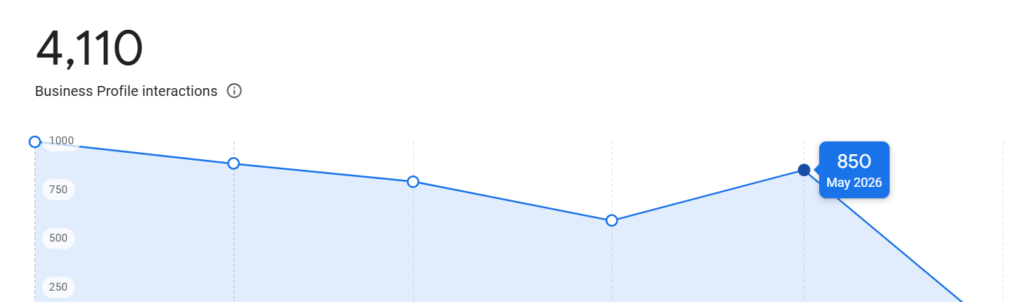
Results: Top 3 rankings for car accessories and modification searches in service area. Monthly inquiries from GBP increased substantially with calls exceeding 400 per month.
Case Study 3: Restaurant/Banquet Hall
Starting point: Brand new profile with zero reviews, no posts, no photos beyond the default.
This case shows what foundational optimization looks like from scratch.
• Categories selected: primary ‘Banquet Hall,’ secondary ‘Restaurant,’ ‘Wedding Venue’
• Services filled with event types: wedding reception, corporate events, birthday parties, social gatherings
• Product section used to showcase catering packages with descriptions
• Aggressive photo upload: hall exterior, decorated setups, food spreads, team photos
• Review generation from first 10 events — in-person QR code at front desk
• Event posts published whenever a booking opened up
Results: Within 4 months, top 3 visibility for banquet hall and wedding venue searches in the area. Consistent inquiry growth month-over-month.
Tracking: How to Know If Your Optimization Is Working
You can’t improve what you don’t measure. GBP provides built-in performance data — use it.
GBP Insights Metrics to Monitor
• Search queries: what terms are people using to find your profile?
• Searches vs Maps visibility: are people finding you through search or maps?
• Website clicks: how many people are visiting your site from GBP?
• Direction requests: are people trying to physically visit you?
• Calls: the most direct conversion metric — how many calls are generated each month?
Setting Up UTM Tracking
Add a UTM parameter to your GBP website URL so you can track GBP traffic separately in Google Analytics. Format: add ‘?utm_source=google&utm_medium=gbp&utm_campaign=local’ to your website URL in your GBP settings.
This tells you not just how many people clicked, but whether they converted — filled a form, booked an appointment, made a purchase.
Monthly Reporting Checklist
• Review count this month vs last month
• Average star rating trend
• Total calls from GBP
• Total website clicks from GBP
• Top 5 search queries driving profile views
• New photos added
• Posts published
Common Mistakes That Kill GBP Rankings
Keyword Stuffing the Business Name
Adding keywords to your business name (‘Best Gastro Doctor Varanasi Clinic’) is a policy violation. Google can suspend your listing for this. It’s not worth the temporary boost, and the boost is rarely significant anyway.
Buying Fake Reviews
Google’s review spam detection has improved significantly. Fake reviews from accounts with no history, from the same IP address, or posted in suspicious clusters are regularly removed. Worse, repeated violations can result in your entire review count being reset or your profile being suspended.
Ignoring Negative Reviews
Every unresponded negative review is a missed opportunity to show potential customers how your business handles problems. Most customers understand that issues happen — what they’re evaluating is how you respond.
Inconsistent Business Hours
If your GBP says you’re open but customers arrive and you’re closed, they leave a negative review. If your hours are wrong, fix them today. Update holiday hours in advance. Google shows ‘currently open’ and ‘closes soon’ badges based on your hours — make sure they’re accurate.
Setting and Forgetting
GBP is not a one-time task. Profiles that were well-optimized a year ago and then abandoned gradually lose rankings to actively maintained competitors. The algorithm favors recent signals — recent reviews, recent posts, recent photos.
The Complete GBP Optimization Checklist for 2026
One-Time Setup
• Claim and verify the profile
• Set exact legal business name (no keyword stuffing)
• Choose the most specific primary category available
• Add all relevant secondary categories
• Add complete address or service area
• Verify phone number and website URL
• Set accurate business hours including special hours
• Write a complete 750-character business description
• Fill out the services section with specific offerings
• Add products if applicable
• Select all applicable attributes
• Seed the Q&A section with 5-10 common questions and answers
• Upload at least 10 high-quality photos across all categories
Monthly Ongoing Tasks
• Publish 4-8 posts (mix of educational, offers, updates)
• Request reviews from satisfied customers
• Respond to all new reviews within 48 hours
• Add 2-3 new photos
• Check and correct any citation inconsistencies
• Review GBP Insights for new search query opportunities
• Update hours if anything has changed
Quarterly Tasks
• Audit all categories — check if newer, more specific options are available
• Full citation audit across all directories
• Competitive analysis — check top 3 ranking competitors for profile gaps
• Review services section for completeness
• Check website-GBP consistency (NAP, services, schema markup)
Final Thoughts
Google Business Profile optimization is not complicated. It is consistent. The businesses that rank in the top 3 are not doing anything exotic — they’re doing the basics better and more consistently than everyone else.
The gap between a well-optimized GBP and an ignored one can be the difference between 400 calls a month and 40. In competitive local markets, that’s the difference between a thriving business and one that’s barely surviving.
Start with the foundation: correct categories, complete services, accurate information. Build trust: consistent reviews, regular posts, active engagement. Extend your authority: citations, website alignment, entity consistency.
Then do it again next month. And the month after that.
Frequently Asked Questions (FAQs)
What is the most important ranking factor in Google Business Profile optimization?
The most important factor you can directly control is your primary business category. Choosing the most specific category that accurately represents your business helps Google understand your services and improves visibility for relevant local searches.
How often should I post on my Google Business Profile?
For best results, publish at least 1–2 posts per week. Regular updates, educational content, offers, and business announcements signal activity to Google and help improve engagement with your profile.
How can I get more reviews on my Google Business Profile?
Ask satisfied customers for feedback through WhatsApp, email, or a QR code at your business location. Encourage them to mention the specific service they received, as detailed reviews build trust and strengthen local SEO signals.
Does my website affect my Google Business Profile rankings?
Yes. Google evaluates your website and GBP together. Consistent business information, location-based content, service pages, schema markup, and a mobile-friendly website can significantly support your local rankings.
How long does it take to see results from Google Business Profile optimization?
Most businesses begin noticing improvements within 2–4 months, while competitive industries may take 4–6 months or longer. Consistent reviews, regular posts, profile updates, and citation building are key to achieving sustainable ranking growth.